Systems · from $99
We set up an operating system for your business in your voice.
We meet you wherever the systems work starts: free and paid audits, The Brain, a Website Clone or full Implementation in clean code, or an ongoing Retainer. You own the build.
Why generic AI sounds generic
Your team opened ChatGPT, asked for a caption, and got something that sounded like every other business on the internet. They closed the tab and wrote it themselves. The problem is not the AI.
It is that AI without context about your voice, your offerings, your customers, and your policies has nothing to work with. It produces an average of the whole internet, which is exactly what nobody wants.
The fix is a context layer: your brand voice, your facts, your FAQ, and your process, written down where your system can use them. Once that is in place, every request your team makes comes out sounding like you wrote it.
Start with the audit or The Brain
One path, not three separate options: the free scan gives you a first read. The Deep Audit (from $300) reviews everything visible on your site and the questionnaire you fill out, then gives you a written roadmap of opportunities to improve your systems and business. Nothing gets built or implemented at this tier. The Brain (from $1,500) turns that roadmap into the business context your AI needs to act on it.
Deep Audit
from $300A thorough audit of your website, SEO, AEO, content, and backlinks that gives you a written roadmap, not a build. The first ten clients who engage Upriver receive it free as an introductory offer.
Best for
Wants a serious second opinion across the whole site and search footprint, plus a written roadmap before investing in a rebuild or systems work.
Included
- Full-site crawl beyond the free superficial scan
- SEO, AEO, content, and backlink review
- Clear opportunities ranked by impact
- Written report you can act on yourself or hand to us for the next tier
What this is not
This is research and recommendations, not the brand voice document, design system, or tool setup. Those start at The Brain.
The Brain
from $1,500The Deep Audit and an interview with Joshua become the large body of written context your own AI reads to do the work in your voice.
Best for
Wants the business knowledge, brand voice, and design language written down in one place, so their AI has the context to work like part of the business.
Included
- The Deep Audit, plus a working interview with Joshua
- Brand Voice Guide, Design Guide, and FAQ bank
- Ads playbook and analytics tracking guide for the work that brings and measures bookings
- The full document set: business facts, policies, and process, written down where your AI can use them
- Delivered as a GitHub repository in your own account, which your AI reads directly
What this is not
This is the written context for your business, not a website rebuild or the external accounts connected to it. Add a Website Clone or full Implementation when you are ready for the site and tools.
Put the context to work
Website Clone (from $1,500) rebuilds your existing site in clean code without redesigning it. Implementation (from $5,500) takes everything in The Brain and turns it into a custom website and connected tools for the way your business runs day to day.
Choose the clone when your current site needs clean, editable code. Choose Implementation when you need a different site, external tools connected, and a model setup that fits how the business runs.
Implementation includes Meta and Google Ads, Google Business Profile, analytics, your CRM connection and financial system setup, and Claude, a local model, or another provider that fits the job. Purpose-built Claude work is also available when the workflow calls for it, priced as needed.
Website Clone
from $1,500We rebuild your existing site in clean code without redesigning it: the same look and content, faster and properly structured so search and AI can read it.
Best for
Wants to keep the site they have while putting it into clean, editable code that loads faster and makes its content easier for search and AI to understand.
Included
- Your existing look and content, rebuilt in clean, AI-editable code
- A faster, properly structured site that search and AI can read
- The Brain and Website Clone together, from $3,000
What this is not
This is explicitly not a redesign. If you want a different site, that is Implementation.
Implementation
from $5,500Everything in The Brain, built into a full custom website with the external accounts set up properly to run and measure the work.
See what is inside →Best for
Needs a different site, not a clone: a custom build, the external accounts connected properly, and a model setup that fits how the business actually runs.
Included
- Everything in The Brain
- Full custom website build in clean, AI-editable code
- Google Analytics, Google Business Profile, Meta, and retargeting set up properly
- CRM connection and financial system setup
- Model setup: Claude, a local model, or another provider, whichever fits
- Purpose-built Claude work, priced as needed
What this is not
This is a full custom site and account setup, not a Website Clone. If your existing site only needs clean code, the clone is the smaller job. Additional Claude work beyond the basic setup is scoped and priced separately as it comes up.
See each part of Implementation in depth:
What is a business operating system?
Everyone is using AI. Most people open Claude, start typing, and get generic results, because it has no idea how your business sounds, what you sell, or how you work. A business operating system is the setup that fixes that: a brand voice document, business facts, design docs, and the rest, so the AI works like it actually knows you.
It comes together in three parts: The Brain, the connections that fit your work, and the workflows you decide are worth building. Claude skills and integrations come after the business context is in place.
Part one
Set up your AI properly
A fully set up system is the documentation that makes Claude work like it knows your business: your brand voice, your design language, your facts, your offerings, your FAQs, and your process, loaded into Claude projects. On top of that go the skills, routines, plugins, and MCP connections that let it act on your behalf instead of just chatting.
The Deep Audit roadmap tells you what should be done. The Brain gives AI what it needs to actually do it: the business facts, brand voice, policies, and process documents it needs to carry out that roadmap on your behalf. We audit your stack, sales process, and security, then build the brand voice, design guide, FAQ bank, AI usage policy, routing plan, backups, and CRM recommendation.
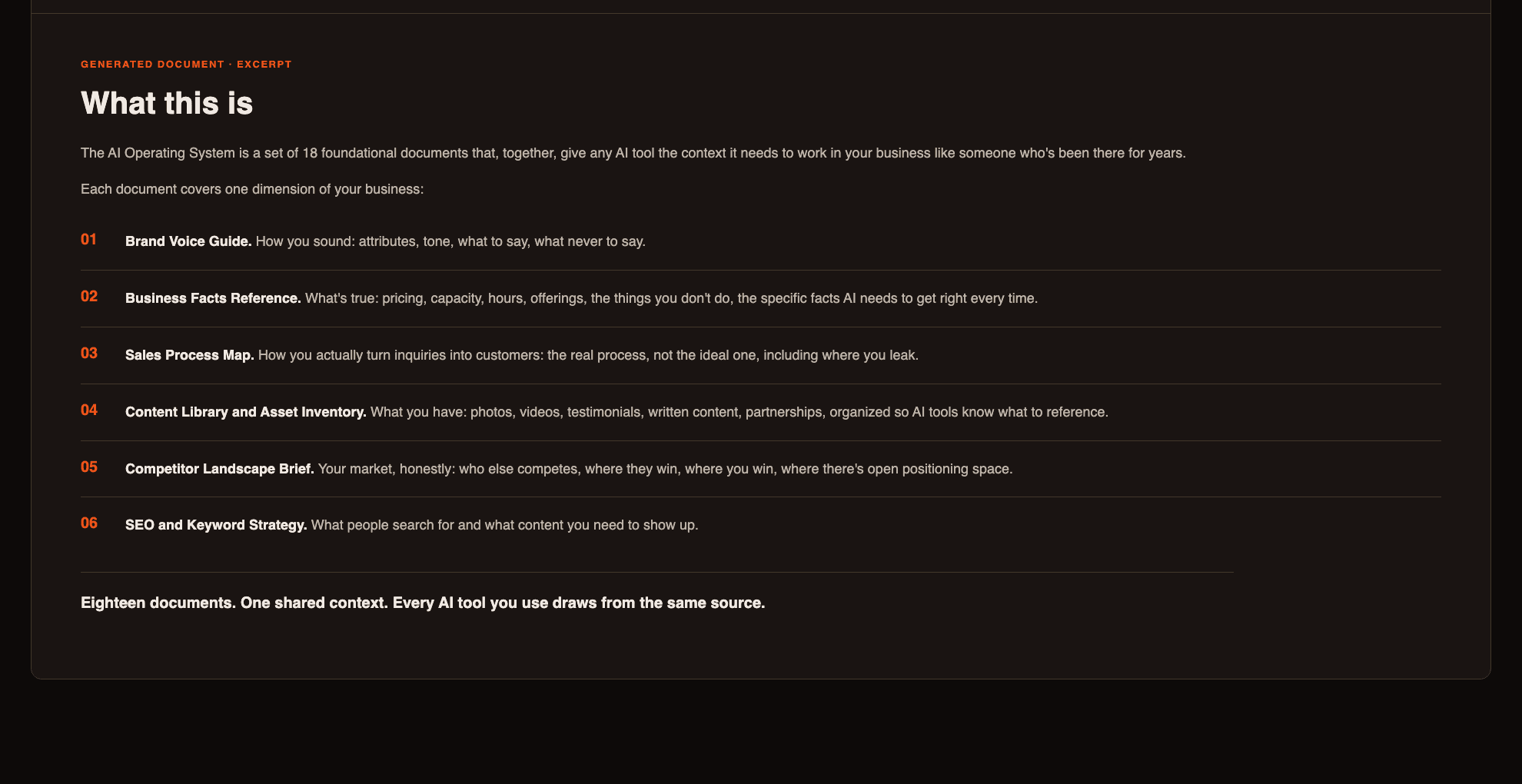
The documentation we build comes in four groups:
Your brand
5 documentsThe written record of how you sound, what is true, and the material your team can use without starting from scratch. It keeps every draft grounded in your voice and the facts of your business.
How you get found
6 documentsThe research and practical guidance behind showing up in the searches that matter, turning interest into useful content, and checking whether the work is paying off.
Operations
7 documentsThe working plan for how the system is built, connected, and handed to your team. It keeps the process clear from the first workflow through onboarding, ongoing work, and the point where you take it over.
Part two
Connect all your tools
First we interview you and map your whole set of tools, everything you actually use to run the business. Then we sort it: which ones connect to Claude through an MCP, which ones have a better or cheaper alternative, and where the gaps are.
We recommend the tools worth adding to fill those gaps, help you drop the ones you pay for and never use, and connect everything that can be connected to Claude. Once it is wired up, your data moves between your tools on its own instead of you copying it between tabs.
Every spoke is one tool connected through MCP.
What comes out the other side
- Inquiry replies drafted in your voice, in seconds
- Blog posts and social captions written from your real work
- Review responses waiting for your approval
- Lead summaries and meeting briefs before every call
MCP and connectable accounts
Examples of some of the tools we can map, connect, or replace
Some connect directly through MCP. Some are accounts we set up or clean up. The point is the same: your tools stop acting like separate islands.
Granola records video calls and turns them into structured notes. OpenPhone handles recorded phone calls and their transcripts, so either kind of conversation can inform the build without manual transcription.
Media and creative
Galleries, video, and brand assets.
Pic-Time
Vimeo
Canva
AI and models
The brains that draft, audit, and act.
Claude
Anthropic
Google Gemini
and Nano Banana
Granola
CRM, projects, and books
Where clients, projects, and books live.
HoneyBook
Asana
Calendly
QuickBooks
Era.app
Comms and outreach
Phone, email, video, and nurture.
OpenPhone
Twilio
Zoom
Loom
Flodesk
Resend
Gmail
Google, search, and ads
Calendar, analytics, search, and paid reach.
Google Calendar
Google Analytics
Google Search Console
Ahrefs
Meta
Dev, hosting, and money
Code, automation, payments, and banking rails.
GitHub
Cloudflare
n8n
Postiz
Stripe
Plaid
Part three
Set up your automations
With your AI set up and your tools connected, we build your automations: inquiry replies, review responses, follow-ups, reports, the handoffs between your tools, all the repetitive work that eats your week, running on their own with you approving what matters.
The real shift is what happens after. You do not go back to clicking through complicated builders in your CRM, n8n, or Zapier. You tell Claude what you want automated, in plain language, and it builds it. New automations become something you ask for, not a project you dread.
After the build
Most systems projects end with a build and handoff. The Retainer keeps us on as your resource for keeping up with AI and keeping your systems current: a monthly call, ongoing updates, and a seat in the community as it opens up.
Retainer
from $99 /mofrom $99 /mo covers small independent businesses. Larger clients with bigger needs, including wedding venues, are quoted separately, from $1,000 /mo.
Best for
Wants an ongoing resource after the build, from a small independent business that needs basic upkeep to a larger client with more work each month.
Included
- About an hour of consultation each month
- Ongoing updates to what we built as tools and models move
- Access to the client community
- Requests for new documents or pages through the portal
- Members-only email list
What this is not
The floor covers small-business consultation and basic upkeep. Larger clients are quoted separately, and this is not active daily monitoring on day one.
See where systems would help you most
The free 60-second audit reads your site and tells you which systems would be highest impact to set up first.